18 Neon Signs for Streamers: On-Air Wall Systems
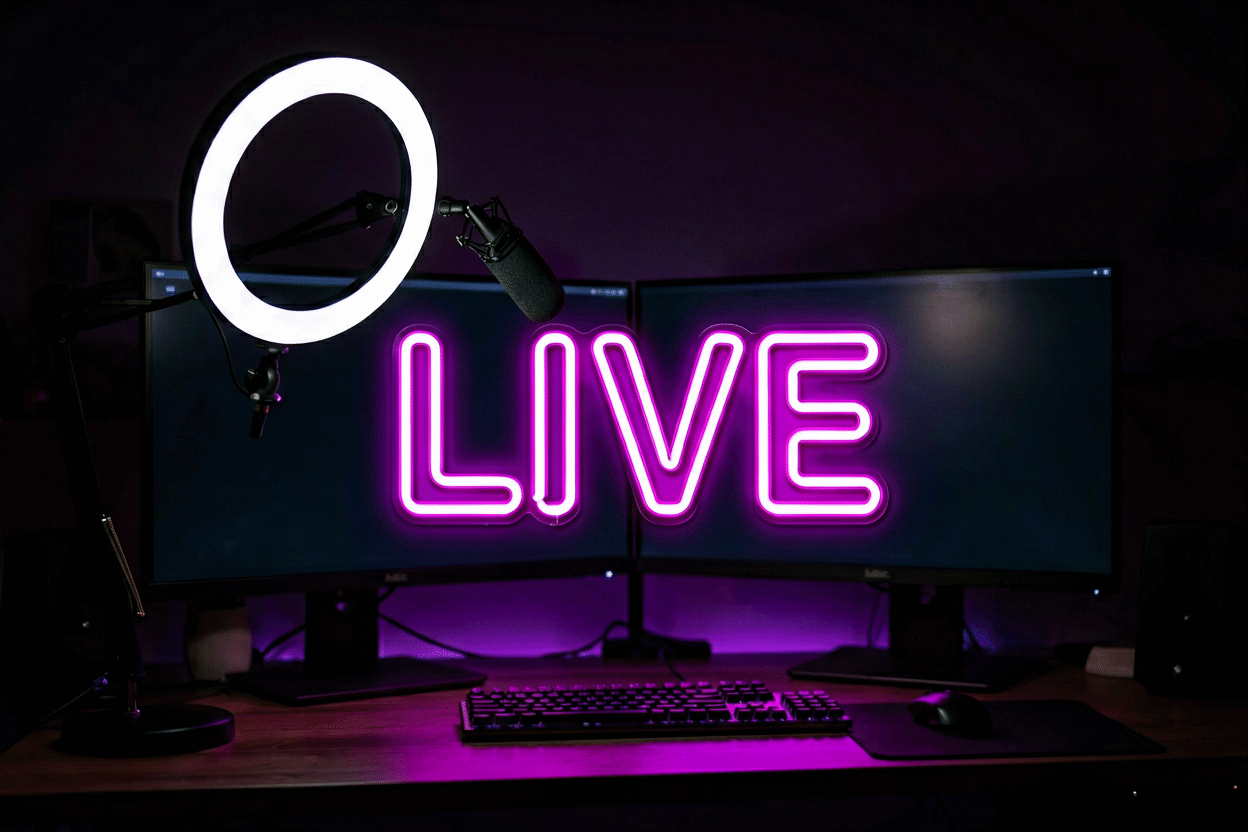
The stream room is a broadcast studio that happens to be a bedroom. Every square foot behind your chair is on camera for hours a day, which makes it the most valuable wall space in the house — and neon is the cheapest per-square-foot upgrade that wall can get. One good sign turns a corner into a set; two coordinated pieces turn a set into a brand.
Here are 18 ideas organized by the jobs a stream wall does: the status sign, the brand build, the depth layer, and the composition systems that keep the frame professional. The broader room canon lives at gaming room neon signs.
The Status Sign: Ideas 1–4
The piece that says the broadcast is live — for the room, the household, and the frame.
- Live On Air — the broadcast classic, rebuilt for the bedroom studio (the phrase tier covers its heritage): red reads “recording” at a glance, and the household learns its meaning within a week.
- “LIVE” in platform red or purple — the minimal version: four letters, wired to the go-live routine. On when streaming, off when not — the sign is the schedule.
- “Do Not Disturb — Streaming” — the door-side piece; the family’s contract with the broadcast, posted in light.
- “REC” — the content-recording register for the multi-platform creator: streams, videos, podcasts, one sign for all of it.
The Brand Build: Ideas 5–9
The pieces that make the channel recognizable before you say a word.
- The channel name in the brand font — the signature build: your handle, your colors, behind the streaming shoulder. Every name previews free in the customizer.
- The logo piece — the emote, mascot, or icon that subscribers recognize; one neon shape does the work of a channel trailer.
- The milestone counter — “10K” or “100K” glowing on the wall: the trophy tier that updates with each milestone (and makes a banger clip when you flip it on).
- The tagline piece — the channel’s catchphrase in neon; the merch-preview logic — if chat would buy it on a shirt, it belongs on the wall.
- The community piece — the subscriber-family name or inside joke; the sign that reads as a members-only handshake in every VOD.
The Depth & Set Layer: Ideas 10–14
The pieces that make a flat wall read like a studio.

- The shelf-back glow — neon set behind a shelf of figures, awards, and cartridges; the depth trick that turns 2D walls into 3D sets.
- The purple studio system — purple is the streaming-native palette (the platform made it so): it flatters every skin tone on camera and reads “creator” instantly.
- The blue tech build — ice blue for the FPS-and-tech channel: cool, crisp, and it keeps monitors the brightest object in frame.
- The split-zone system — gaming wall cool, talking-head wall warm: one room, two content modes, zoned by glow temperature.
- The accent panel — a small neon shape on an acoustic panel’s edge; the trick that makes sound treatment look like set design.
The Composition Systems: Ideas 15–18
- The shoulder rule — brand pieces mount behind your off-camera shoulder, never behind your head: the composition every major stream room converges on. Head-center signs read photo-booth; shoulder-adjacent signs read broadcast.
- The reflection audit — neon placed to glow in the frame, not in the lens: check for camera flare at your seated eye level before final mounting (placement mechanics).
- The brightness protocol — signs at 60–70% for stream glow (full power blows out compressed video), 30% for late sessions; the dimmer is the cheapest “stream looks expensive” upgrade there is.
- The go-live ritual — sign, lamp, and intro on one smart tap: the broadcast’s opening ceremony, and the power cost of the ritual rounds to zero.
Building the Wall in Order
The stream wall builds in a specific sequence because each layer depends on the last. First the status sign (the “Live On Air” tier): it’s the room’s functional core and the piece the household learns fastest. Second the brand piece (name or logo, shoulder-mounted): it’s what makes the frame yours in the first three seconds chat sees it. Third the depth layer (shelf glow, accent panels): this is where the room starts reading studio instead of bedroom. The extras — milestone counters, community pieces — arrive when the community does.
Color discipline is stricter on camera than off: pick one dominant register (purple or blue covers most channels), keep the status sign red, and resist the rainbow tier until the brand is strong enough to carry it. Skin tones read best under warm accents — if you’re the frame’s main subject, a warm piece on the camera wall does more for the stream than any cool piece behind the monitor. The gamer crossover canon covers the identity pieces in depth.
The Broadcast Engineering: Color Science and Brightness Protocol
The stream room’s neon is video equipment, and the broadcast tier runs by color science rather than room aesthetics.
The skin-tone law. The camera-facing wall’s palette flatters the face on camera: warm accents (amber, soft pink, warm white) bounce warm light onto the subject; the full-cool wall (all blue, all purple) cools the face and reads institutional on compressed video. The working composition: the cool identity piece (purple or blue – the platform-native register) plus one warm accent on the camera wall – the two-temperature system that carries the stream’s brand and the streamer’s face simultaneously (the color logic runs the same physics for businesses on camera).
The brightness protocol. Compressed video amplifies glow: the piece that looks perfect in the room blows out in the upload. The broadcast standard runs signs at 60-70% for stream hours (the exposure that survives the platform’s compression), full for stills and promo shots (the camera-off tier), and 30% for the late-session VODs where the room’s mood matters more than its energy. The dimmer is the stream room’s cheapest production value – the difference between the amateur’s blown-out wall and the professional’s controlled glow.
The lens-flare geometry. The camera’s position defines the exclusion zones: no neon in the lens’s direct flare band (the diagonal strip between the camera and the room’s light sources), no brand piece behind the head (the photo-booth read), no glow competing with the key light (the face’s illumination wins, always). The ten-minute camera-phone audit at seated position – looking for flare ghosts and blown bands – saves the re-mount that follows the first month of unusable B-roll.
The Stream Room’s Budget by Stage
The starting streamer ($60-150): the status sign (Live On Air in red) and one depth piece (the shelf-back glow) – the room’s function and its first production value. The growing channel ($150-450): the brand piece (the channel name or logo, shoulder-mounted – preview), the brightness protocol’s dimmer stack, the reflection-audited composition. The established brand ($450-1,000): the milestone counter, the community piece, the two-zone system (gaming wall cool, talking-head wall warm) – the room that subscribers recognize on sight, which is the tier’s entire point.
The ROI note every streamer discovers: the brand piece is the cheapest subscriber-retention tool in the room – the sign chat sees every day is the sign they remember when the algorithm isn’t running your way (the marketing case runs the same logic for businesses).
Variations and Pairings
The streamer canon’s variants. The word-face variants: “neon signs for streamers,” “twitch room neon,” and “stream setup neon” serve the tier; the platform faces (the purple-native register versus the platform-agnostic) skew the palette choice. The crossover faces: the gaming room (the setup guide) carries the general tier; the podcast studio (the studio canon) carries the audio-first version; the home office (the office guide) carries the day-job version of the same camera wall.
The pairing logic: the stream wall pairs the brand (the channel name) with the status (the “Live On Air”) – the identity and the schedule on separate circuits. The pairings that work run the shoulder-mount composition with the brightness protocol; the pairings that fail run the head-center sign (the photo-booth read) and the full-power wall (the blowout upload).
The growth pairing: the streamer’s program pairs with the channel’s milestones – the first affiliate check earning the brand piece, the partner tier earning the milestone counter – the sign program tracking the career’s ladder (the budget stages above).
FAQ About Streamer Neon Signs
What’s the best first sign for a stream room? The status sign — Live On Air in red. It’s functional (household contract, on-air cue), cheap, and it makes every session feel official. The brand piece comes second and costs more deliberation.
Do neon signs look good on stream? They’re the highest-value background layer in streaming: vivid at low brightness, colored depth behind your shoulder, and instantly brandable. Run at 60–70%, mount shoulder-side, and keep them out of lens-flare positions — the composition rules have the mechanics.
Where exactly should signs go in a stream room? Behind the camera-facing shoulder for brand pieces, door-side for the status tier, shelf-level for depth glow. Never directly behind your head, never opposite the monitor’s reflection band.
How do I match my sign to my channel brand? Start with the platform-native registers (purple, blue), then migrate to your exact brand colors once the identity sticks — the customizer previews any hex. Consistency beats novelty: the sign chat sees every day is the sign they remember.
Will a neon sign make my stream look better? It is the highest-value background upgrade per dollar: the glow gives the frame color depth, the brand piece gives it identity, and the layered composition gives it the production value that the bare wall cannot (the streamer case above). The conditions: the sixty-to-seventy-percent brightness band (full power blows out compressed video), the shoulder-mount placement (the head-center sign reads photo-booth), and the reflection audit (the camera-phone test at seated position catches the flare before the stream does). The streamer wall that meets the three conditions upgrades every frame it appears in; the wall that misses one fights the stream it should be serving.
What neon sign should a new streamer buy first? The status sign – Live On Air in red – because it does functional work from day one (the household treaty, the on-air discipline, the session’s ritual) at the entry price. The brand piece (the channel name, shoulder-mounted – preview) comes second and deserves the deliberation: it is the piece the chat sees every day and the subscribers remember, and it is worth buying right rather than buying now. The starting tier runs $80-200 total; the upgrades arrive with the milestones (the budget stages above pace the program to the channel’s growth).
Sources & Further Reading
- Neon sign (Wikipedia) — the consolidated public record of neon-sign history and technology.
- Neon, element 10 (Wikipedia) — element properties: density, boiling point, abundance.
Pricing based on CustomNeon’s current catalog (2026); custom quotes come live from the sign builder.